
Architects: Budget $1,200–$4,000 for Job Ready AutoCAD Training


Expect to pay somewhere between free and $200 for a self-paced beginner course, around $1,000 to $3,000 for live instructor-led training, and $3,000 or more for a full certificate program. Budget a few days for a working introduction, and multiple weeks or months if you want certification-ready skills. Whatever price you see quoted, add software and hardware costs before you compare options.
TL;DR:
Self-paced courses often cost less than $200 and provide basic tutorials, but lack personalized feedback necessary for true skill development.
Live instructor-led courses range from $1,000 to over $3,000, with smaller class sizes offering more direct instructor support and feedback.
Certification programs exceeding $3,000 include comprehensive training, assessments, and sometimes college credit, suited for formal credentials.
Learning durations vary from 1-3 days for basic skills to over 200 hours in extensive courses, with additional practice time essential before working professionally.
Additional costs such as software subscriptions, hardware upgrades, and exam fees can significantly raise the total expense, often pushing the total budget to $1,200 or more.
Table of Contents
AutoCAD Course Cost by Format: Self-Paced, Live, and Certificate Programs
The price tag on an AutoCAD course tells you almost nothing until you know what format it’s attached to. A $49 video series and a $3,500 certificate program both claim to “teach AutoCAD,” but they’re solving completely different problems for completely different learners.
Self-paced and on-demand courses sit at the bottom of the price ladder, and for good reason. Basic tutorial libraries often run free to under $200, while more complete on-demand packages with structured modules land in the $200–$800 range, according to Noble Desktop’s cost breakdown. At the low end you’re getting video lessons and maybe a practice file. At the higher end, you should expect exercise files, quizzes, and some kind of progress tracking. What you almost never get at this price point is direct feedback on your work, which matters more than most beginners realize.
Live online, instructor-led courses cost more because you’re paying for a person’s time, not just their recorded voice. These typically run from around $1,000 up to $3,000 or more for multi-day, in-depth formats, per Certstaffix’s pricing overview. Smaller class sizes push the price up because instructors can only give meaningful feedback to so many people at once. A 6-person live cohort costs more per seat than a 30-person webinar for a simple reason: you’re actually getting looked at.
In-person workshops occupy similar territory, often bundled with access to lab computers and licensed software during class hours. That software access is worth factoring in, since it can meaningfully lower what you’d otherwise spend on a personal AutoCAD subscription.
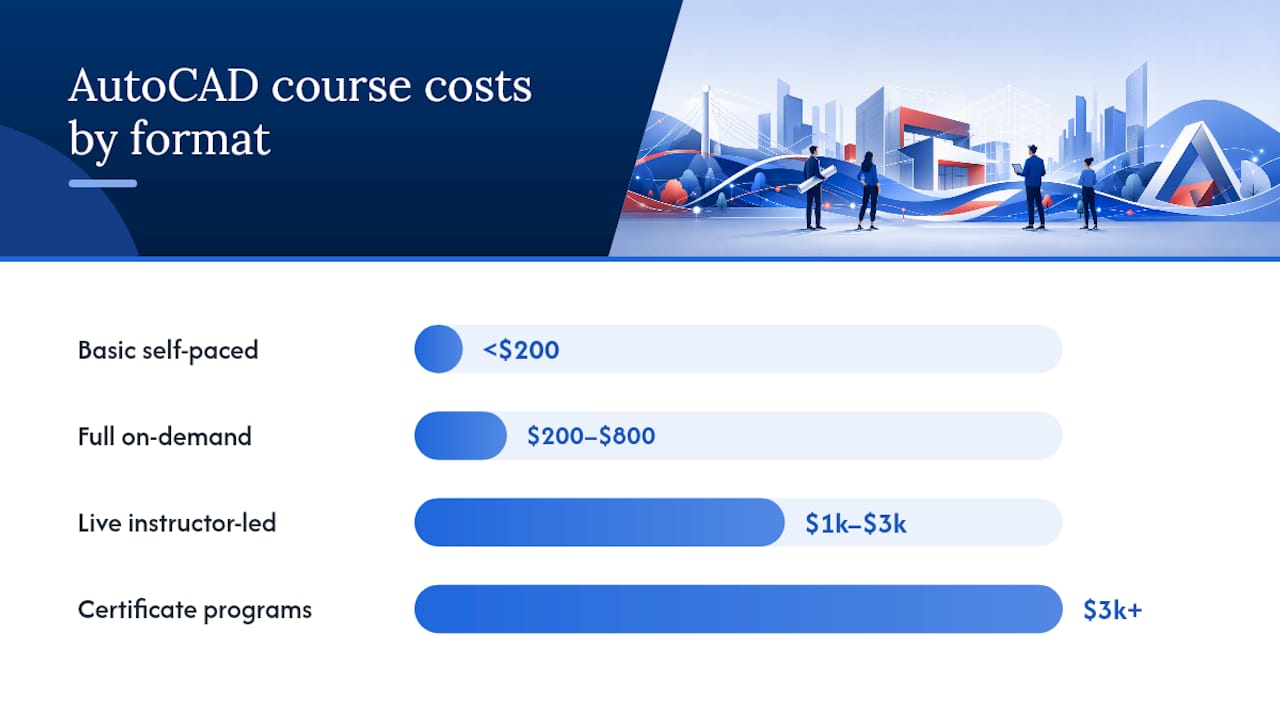
Certificate programs are the most expensive tier, frequently exceeding $3,000 depending on the institution, according to ONLC’s course guide. The jump in price reflects a jump in scope: more contact hours, formal assessments, and sometimes college credit that a short course simply doesn’t offer. If you need a credential that a hiring manager or an academic institution will recognize on paper, this tier earns its cost. If you just need to draft a floor plan competently, it’s overkill.
A few pricing patterns worth knowing before you shop around:
Combo packages (like an “essentials plus advanced” bundle) usually cost less per hour than buying the same two courses separately.
Courses bundling a certification exam voucher can save money versus paying for training and the exam independently, since Certstaffix notes bundled packages are often more cost-effective than piecemeal purchases.
Portfolio review add-ons, when offered, tend to add a modest flat fee rather than scaling with course length.
Prices tied to physical lab access (workstations, licensed seats) run higher than pure video-based formats, but they eliminate a software cost you’d otherwise pay yourself.
Paying more isn’t automatically smarter, but the extra money at the higher tiers usually buys something specific: instructor access, structured project work, or certification support that employers actually notice on a resume.
How Long Does It Take to Learn AutoCAD?
Course duration splits into roughly three tiers, and knowing which one you’re buying matters as much as the price.
Self-paced courses list a total number of video hours, often 5 to 20 hours, but that number is misleading on its own. Completion rates for self-paced online courses are notoriously low across the e-learning industry, so the real timeline depends on how disciplined you are about finishing what you started, not what the course listing promises.
Short live courses typically run 1 to 3 days, delivered either in a classroom or over video call. After a solid 1 to 3 day course, most learners can competently draft 2D layouts, use basic dimensioning tools, and navigate the interface without constantly hunting for commands. What you won’t have yet is speed, and speed is what actually gets used on the job.
Combined series and certificate programs stack up to 30 to 200-plus hours across weeks or months. These cover advanced 2D and 3D workflows, layout management, and often a full certification exam prep track. This is the tier that produces something closer to job-ready proficiency, not just familiarity.
Here’s the part course marketing rarely says out loud: finishing the course is not the same as being ready to use AutoCAD professionally. Budget real practice time after the course ends, ideally 20 to 40 hours applying what you learned to independent projects, before you expect your speed and accuracy to hold up in an actual office. A set of structured practice projects gives you something concrete to work through during that gap, rather than staring at a blank drawing file wondering what to draft next.
What’s Included in the Price, and What Costs Extra
A course fee rarely covers everything you’ll need to actually use AutoCAD. Knowing the split between what’s bundled and what you’ll pay separately keeps you from getting surprised halfway through.
What most course fees include:
Instructor time, whether live sessions or recorded lecture content
Exercise files and practice drawings to work through
PDF notes, cheat sheets, or downloadable reference material
A completion certificate, though this is different from an Autodesk-recognized credential
In some bundled packages, a certification exam voucher
What usually costs extra:
Software licensing. Some in-person and live-online courses include temporary AutoCAD access during class, which meaningfully lowers your out-of-pocket software cost compared with fully remote formats where you’re expected to already have your own license. Check this before you enroll, not after.
Hardware. If your laptop struggles to open a Chrome tab and a Zoom call at the same time, it will struggle with AutoCAD’s rendering demands. Budget for an upgrade if your machine is more than 4 to 5 years old.
Certification exam fees, if not bundled into your course package.
Time off work or commuting costs, for in-person formats, which rarely show up in the advertised price but absolutely show up in your actual spend.
Pro Tip: Ask every provider one specific question before you pay: “Is AutoCAD software access included during the course, or do I need my own subscription?” The answer changes your real cost by hundreds of dollars, and it’s often buried in the fine print rather than the headline price.
Multiple training overviews flag software subscription cost as the most commonly overlooked line item in a learner’s budget, which is exactly why it deserves a direct question rather than an assumption.
How to Pick the Right AutoCAD Course for Your Budget and Goals
Price alone tells you almost nothing about whether a course will actually get you where you want to go. Compare providers against a short list of concrete criteria instead.
Start with learning outcomes. A good course syllabus tells you specifically what you’ll be able to produce by the end, not vague language like “master AutoCAD.” Look for named deliverables: a completed floor plan, a dimensioned elevation, a working title block.
Check for project-based work, not just command tutorials. Employers evaluate what you’ve built, and structured, project-based practice accelerates employability more reliably than isolated lessons on individual tools.
Verify instructor credentials. An Autodesk Certified Trainer designation means the instructor has been vetted by Autodesk itself, which is a meaningfully different bar than “has used AutoCAD for a few years.”
Ask about certification support. Does the course prepare you specifically for the Autodesk Certified User exam, or is certification an afterthought mentioned once in the marketing copy?
Before enrolling, ask providers directly:
Is AutoCAD software access included, or do I need my own subscription?
What’s the typical class size for live sessions?
What’s your refund policy if the course doesn’t match what was advertised?
Can I see a sample lesson or a piece of student project work first?
Does the fee include an exam voucher, or is that a separate purchase?
Watch for a few red flags. A course with no visible sample content or student work is asking you to buy blind. A syllabus built entirely around passive video watching, with no exercises or project deliverables, tends to leave gaps that only surface once you’re expected to work independently. And a price that seems dramatically lower than everything else in its format category usually means something’s missing, whether that’s instructor access, updated software versions, or exam prep.
A tight comparison checklist covers: clear learning outcomes, project-based deliverables, verifiable instructor credentials, certification alignment, transparent refund terms, and confirmed software access. Run every course you’re considering through that list before you commit.
Free and Low-Cost AutoCAD Learning: What You Actually Get
Free resources have a real place in learning AutoCAD, just not the place most people assume.
YouTube tutorials, Autodesk’s own official AutoCAD resources, and free trial software give you a legitimate way to test whether AutoCAD’s workflow even fits how you think. That’s genuinely useful before spending money on anything. What free resources rarely provide is structure, feedback, or a sequence that builds toward a specific outcome. You watch a video on layers, then a different creator’s video on dimensioning, and nothing connects the two into a coherent skill.
Free learning works well for:
Testing basic interest before committing money
Learning individual tools or commands in isolation
Refreshing a skill you already have but haven’t used recently
Free learning tends to fall short for:
Building a coherent portfolio piece that demonstrates applied skill
Getting feedback on whether your drawing conventions match industry standards
Preparing specifically for a certification exam
The most cost-effective path for many learners isn’t choosing free versus paid. It’s sequencing both: use free tutorials to confirm the software fits your goals, then invest in a short paid course once you know exactly what skill gap you’re paying to close. That combination usually costs less overall than jumping straight into an expensive program before you know what you actually need from it.
Why Project-Based Training Changes the Cost Equation
Steve Fagan, an Autodesk Certified Trainer, founded S15studio specifically to close the gap between “finished a course” and “ready to work.” That gap is exactly where most learners lose value, regardless of what they paid.
S15studio’s project-based AutoCAD and Revit training builds toward real deliverables rather than isolated command tutorials, with exam preparation for Autodesk Certified User credentials built into the structure. That approach lines up directly with what employers actually screen for: evidence of applied work, not a list of tools you’ve clicked through.
Against the price and duration bands covered earlier, project-based training sits in a strong position. You’re not paying certificate-program prices for something you could learn from a free video, and you’re not stuck with a $49 tutorial series that leaves you unable to produce a portfolio-ready drawing. It’s built for the middle ground where most serious learners actually need to land.
Refund Policies and Financial Aid: What to Check Before You Pay
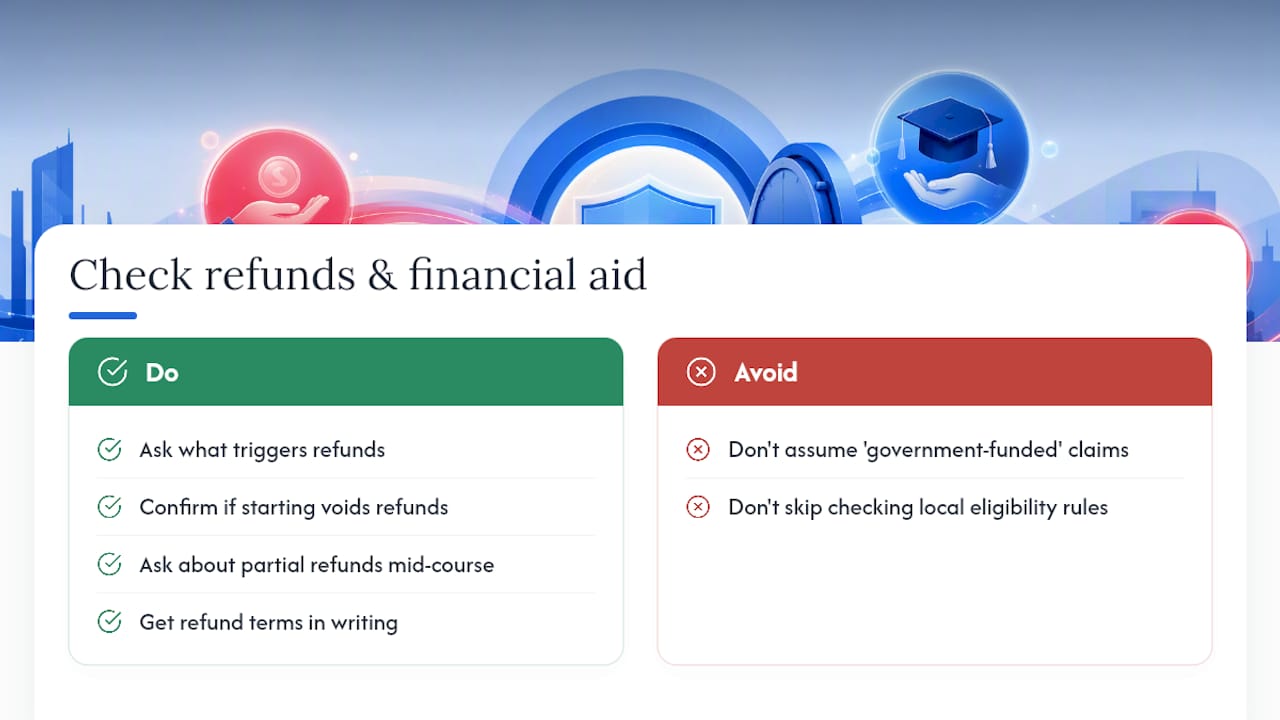
Refund terms vary enormously between providers, and the fine print matters more than the marketing page. Some courses offer a short window, often 7 to 14 days, to request a full refund if the content doesn’t match expectations. Others treat all sales as final the moment you access the first lesson, particularly for cheaper self-paced formats where there’s no live instructor time to “reclaim.”
Ask specifically what triggers a refund and what doesn’t. Does starting the first module void your eligibility? Is there a partial refund if you drop out midway through a multi-week program? Get the answer in writing before you pay, not after something goes wrong.
Financial aid is less common for private AutoCAD courses than it is for accredited certificate programs at colleges, where standard student aid rules may apply. Learners in Ireland and across the EU should also check whether adult education or upskilling supports apply to their situation. Programs funded through the European Social Fund Plus and similar national schemes sometimes subsidize vocational technical training, including software skills relevant to architecture and design work. Eligibility rules vary by scheme and region, so confirm current terms directly with the fund or a local employment support office rather than assuming a course provider’s marketing claims about “government-funded training.”
Calculating Your Real Total Cost, Not Just the Sticker Price
The advertised course price is rarely your final number. A realistic total cost estimate stacks four categories on top of each other.
Start with the course fee itself, using the bands covered earlier: under $200 for basic self-paced, $200–$800 for fuller on-demand packages, $1,000–$3,000 for live instructor-led training, and $3,000-plus for certificate programs.
Add software cost if it isn’t included. An AutoCAD subscription is a recurring expense, not a one-time fee, so factor in at least a few months of access while you’re learning and practicing.
Add hardware, if your current machine can’t reasonably handle AutoCAD’s graphics demands. This isn’t a cost every learner faces, but for anyone on an older laptop, it’s a real line item.
Finally, add certification exam fees if they’re not bundled into your training package, plus any incidental costs like commuting or lost work hours for in-person formats.
Put together, a realistic learner pursuing live or certificate-level training with their own software subscription might reasonably budget somewhere in the $1,200 to $4,000 range once every category is counted, depending heavily on which format and provider they choose. Someone sticking to self-paced learning with an existing subscription and adequate hardware could stay well under $500 total.
An Autodesk Certified Trainer’s Take on Spending Wisely
Here’s what I’ve noticed after years of watching learners choose courses: people optimize for the wrong variable. They chase the lowest price when they should be asking whether the course produces a deliverable they can show a hiring manager. A $150 course that leaves you unable to draft a real floor plan is more expensive than a $900 course that gets you there, because you’ll end up paying twice.
Do check whether project work is built into the curriculum. Don’t assume a certificate automatically means job-ready skill. Do ask about software access before comparing prices head to head. Don’t buy the cheapest option purely because it’s cheapest.
Balance price against outcome, not against duration. A shorter course that produces a real portfolio piece beats a longer one that only produces notes.
— Steve
Where to Start With S15studio’s AutoCAD Courses
Skip the guesswork on which course fits your budget: match your current skill level to the right entry point instead. If you’re starting from zero, S15studio’s beginner-to-advanced AutoCAD course is built around real project deliverables rather than isolated tool tutorials, so you finish with something you can actually show. If certification is the goal, the combined Revit and AutoCAD training with exam prep folds Autodesk Certified User exam preparation directly into the curriculum, which avoids paying for training and exam prep as two separate purchases.
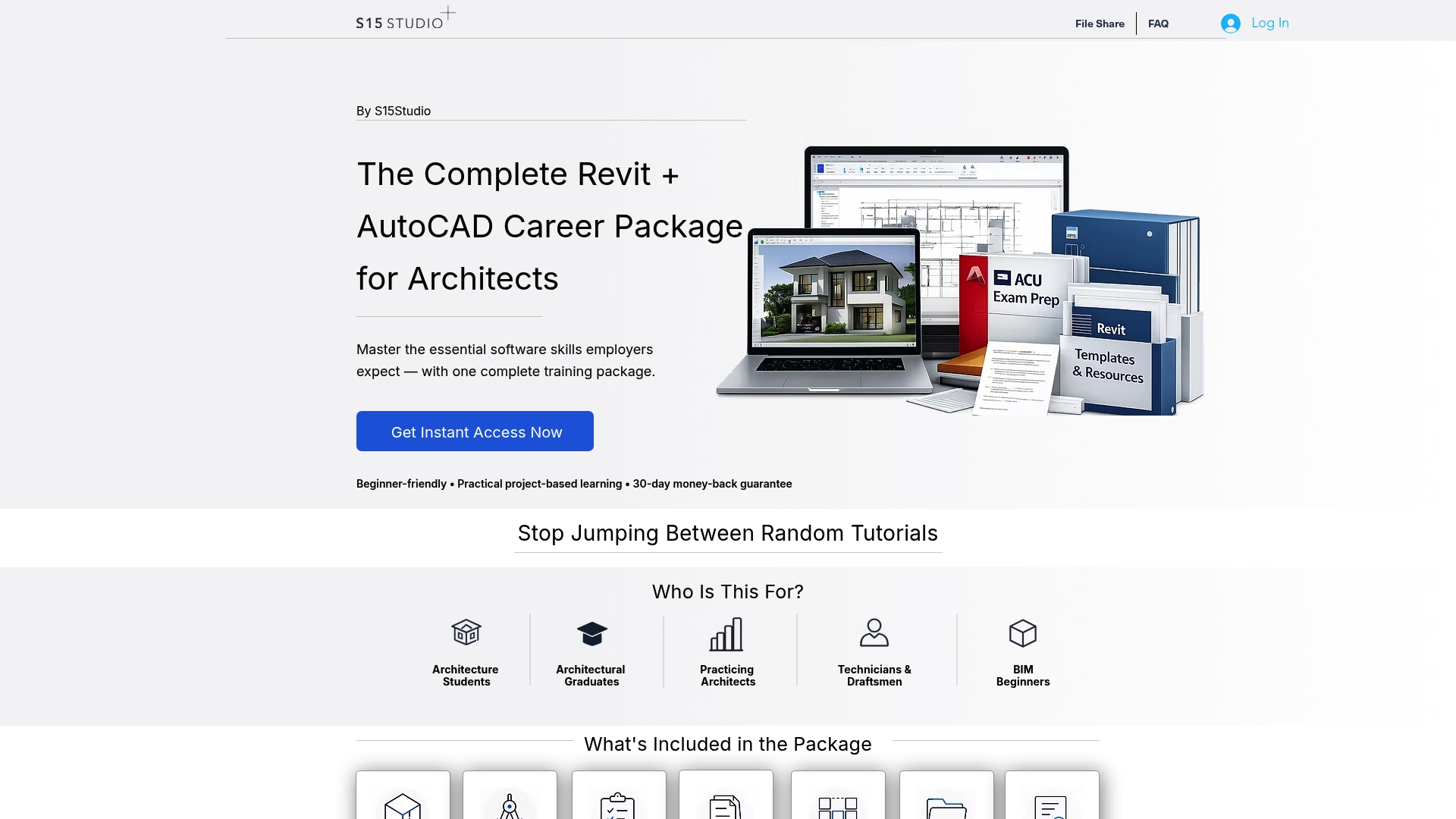
Courses include trainer support and access to materials beyond the final lesson, unlike many self-paced platforms. If you’re weighing a project-based online format against a traditional classroom provider like Oxford Training Centre, the core trade-off comes down to flexibility versus fixed scheduling. This format lets you build your portfolio piece on your own timeline while still getting direct trainer feedback, which is the part self-paced video libraries can’t offer at any price.
Check the course options page to see which package matches your current level, and reach out with questions before you commit to a plan.
Sources
For provider-specific pricing that changes over time, check current catalogues directly: Noble Desktop’s AutoCAD cost breakdown covers self-paced and on-demand pricing ranges, Certstaffix’s training guide details live-course pricing and duration, and ONLC’s course guide shows combo-package pricing structures. For official software guidance and training philosophy, see the Autodesk blog. Learners in Ireland checking for funding supports can review the European Social Fund Plus for current adult-education program eligibility.
FAQ
Are AutoCAD courses worth the cost?
For most architecture and design career paths, yes, especially courses built around real project work rather than passive video watching. The value comes from what you can demonstrate afterward, not the certificate itself.
How much does it cost to learn AutoCAD?
Costs range from free to under $200 for basic self-paced tutorials, $200–$800 for fuller on-demand courses, $1,000–$3,000 for live instructor-led training, and $3,000-plus for certificate programs, before adding software and hardware costs.
Can I learn AutoCAD for free?
You can learn individual tools and test basic interest using free tutorials and trial software, but free resources rarely provide the structured feedback or certification prep that a paid course delivers.
How long does it take to learn AutoCAD?
A short live course (1 to 3 days) gets you drafting basic 2D layouts, while certification-ready proficiency typically requires 30 to 200-plus hours across a combined course series, plus additional independent practice afterward.
Recommended
Comments